Lead Product Designer
Designing map based intelligence workflows
Turning crop production and crop performance data into spatial understanding, explorable from national food security policy down to individual field conditions
Turning crop production and crop performance data into spatial understanding, explorable from national food security policy down to individual field conditions
5 monitoring contexts shipped on the same pattern
Crop Production, Fertiliser Subsidy, Water Stress, Crop Health, and Soil Exposure, each a distinct surface, all driven by the same spatial layer, navigation, and drill-down model.
From 5 months to 2 months per new context
First context (Crop Production) took five months from design to ship. By the fourth, the pattern was stable enough to ship a new context in two, the system became its own multiplier.
Used across 3 country governments · ~8 sessions/day
Active in production with food security advisors and ministry analysts across three governments, averaging eight monitoring sessions per day.
Food security is the outcome of many conditions, tracked separately, by different teams, across different timescales, with no shared view.
The key variables:
Countries can access some of this data, through various ministries and regional offices. What didn't exist was a way to see all of it in the same place.
The result was that decisions were made on guesswork. Officials requested data from regional offices, waited weeks for responses, received inconsistent formats, and manually reconciled everything into a picture already out of date. No one could see how drought in one region connected to food security risk in another. The numbers existed, but they couldn't be read together.
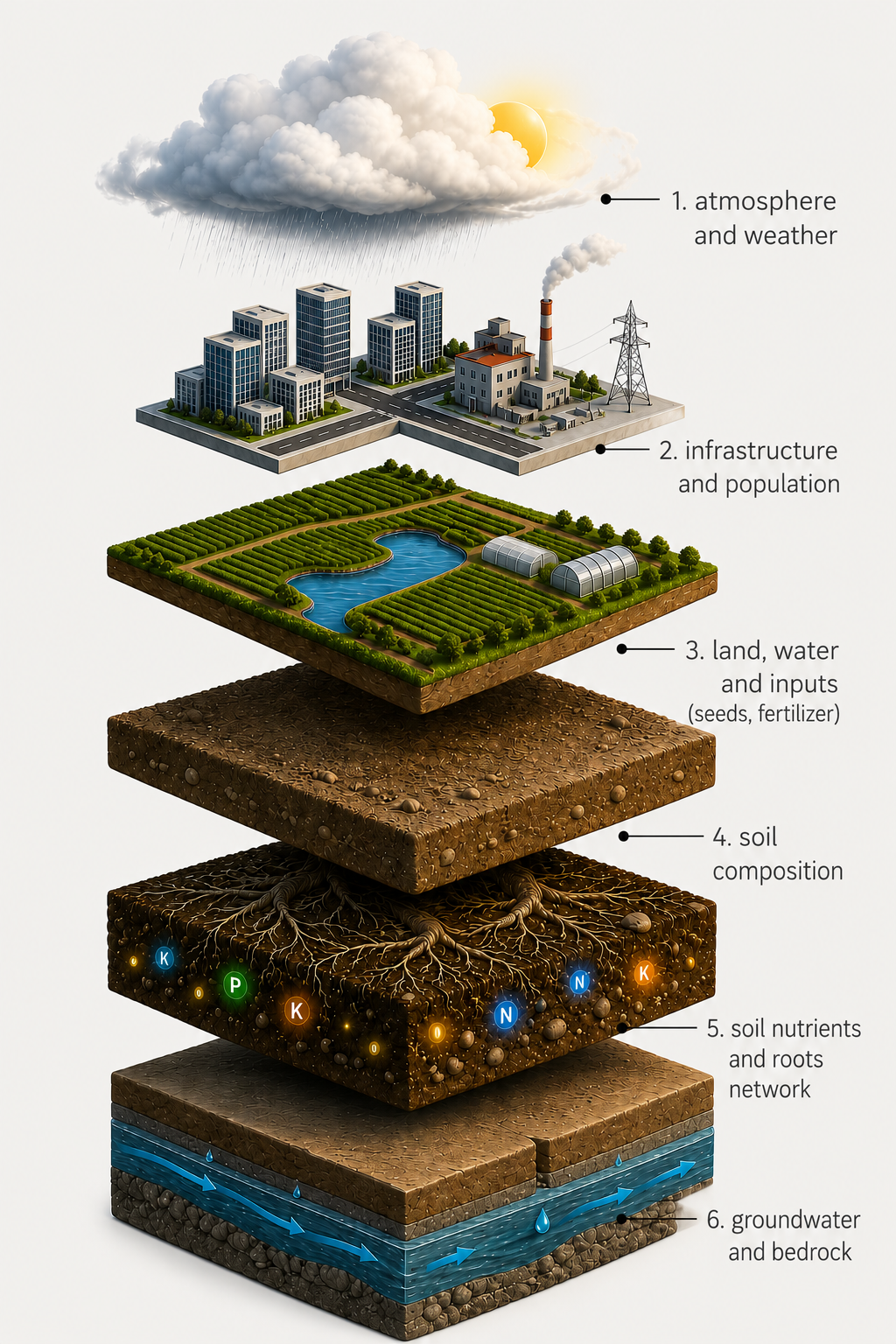
So that decision-makers can act on a reliable, current picture of food security, knowing which regions are at risk, which indicators are deteriorating, and what the intervention window is. Without this, decision-making is reactive: action only follows after a crisis has already materialised.
From Agriculture Intelligence, Visual Explorer is the surface that responds to this goal.
The problem we needed to solve was how to bring together the many dimensions that shape food security and show how they connect. Government officials, ministry teams, and national advisors needed to track those dimensions over time, so shifts could be recognised early enough to act on while there's still a window.
Before designing anything, we mapped what that visibility actually requires, the behaviours, frequencies, and information volumes the system had to support for a user like Mayeso.
An analyst spends weeks gathering and reconciling data, then has days — not weeks — to act on it. Six numbers capture the cost of that gap, and what the system had to compress.
Each monitoring context had its own question, its own visualisation, and its own level of detail depending on who was looking at it. Building for one context first would have locked the system into a shape that didn't extend. The goal was a replicable framework, something that works for crop production and works equally for water stress, crop health, and any context added later.
The data has to move across four dimensions at once. Build for one and the system locks in. Build for all four and the surface becomes legible at every scale.
Crop production, water stress, fertiliser, health — each with a different question, visualisation, and audience.
The same signal reads differently at national, district, and field level — resource allocation vs deployment vs irrigation.
Every context has a temporal axis — week-over-week, season-over-season. Static views can't hold it.
Aggregate signal, per-crop breakdown, field-level anomalies — the hierarchy doesn't stop at the administrative boundary.
We explored four ways to structure the two primary axes — contexts and administrative levels. Approach D won because it kept the country itself as the constant: contexts switch as overlays on top, so the user never loses the geographic frame.
Each context — production, subsidy, water stress, crop health — answers a different domain question, but the design framework is the same. The same approach, repeated for every context the platform supports.
Crop production is the base layer of food security. How much a country produces, and how that performance shifts over time, is the bedrock every other agricultural decision sits on. Before this, that picture wasn't visible at the regional level — officials had to wait for end-of-season data instead of seeing it as it formed.
What we set out to do was forecast and monitor production in season, so teams could plan ahead for the kinds of decisions that only get made when the picture is visible early enough to act on:
Where each crop is grown across the country and how each is performing against the others. One visual reference for nationwide context.
Fertiliser subsidies are government interventions designed to make fertiliser more affordable, particularly for smallholder farmers in low-income countries. The aim is to lift agricultural activity, raise crop production, and through that, strengthen food security. Kenya, for example, has spent approximately US$310 million per year on the programme for nearly a decade.
Whether the spending actually delivers, however, is debated. Some programmes show real agricultural lift. Others struggle against:
What we set out to do was surface the data, so the link between fertiliser distribution, farmer participation, and crop outcomes can finally be seen in one place. With that visibility, programme officers can see where the subsidy is working, where it isn't, and make better decisions ahead of next season.
Distribution of warehouses and farmer locations. Shows who applied for the subsidy, who collected it, and who hasn't applied at all, so officers can target action.
Beyond government data, Visual Explorer holds a family of satellite-derived monitoring signals: Water Stress, Crop Health, Nutrient Deficiency, Canopy Structuring, Pest & Disease, Deforestation, Degrading Land, Soil Exposure. Eight contexts, one scaffolding. The design challenge wasn't which spectral indices to use — that's an agronomy decision. It was deciding which signals a ministry official can act on directly, and which need a data specialist to interpret. That distinction shapes what the map shows.
NDWI and MSI indices rendered as a 10m gradient tile map. Stress is classified mild, moderate, or severe per location, with pass-by-pass trends and season-over-season comparison.
The first version of the map averaged everything out by region. Each province was rendered as one colour based on its overall average. The engineering wasn't ready to show finer detail yet, so this was the closest we could get to a workable view.
Feedback from extension workers in the field and ministers in the capital surfaced the same issue: averaging hid the parts of the country that were actually struggling. A region that was 80% doing fine and 20% severely stressed looked, on the map, mostly fine. The places that needed attention disappeared inside the average.
So we rebuilt the rendering so the map shows the data the way it actually exists, location by location, instead of summarised into a single regional colour. Stressed fields show as stressed, healthy fields as healthy, regardless of what's around them. Drag the slider to compare.
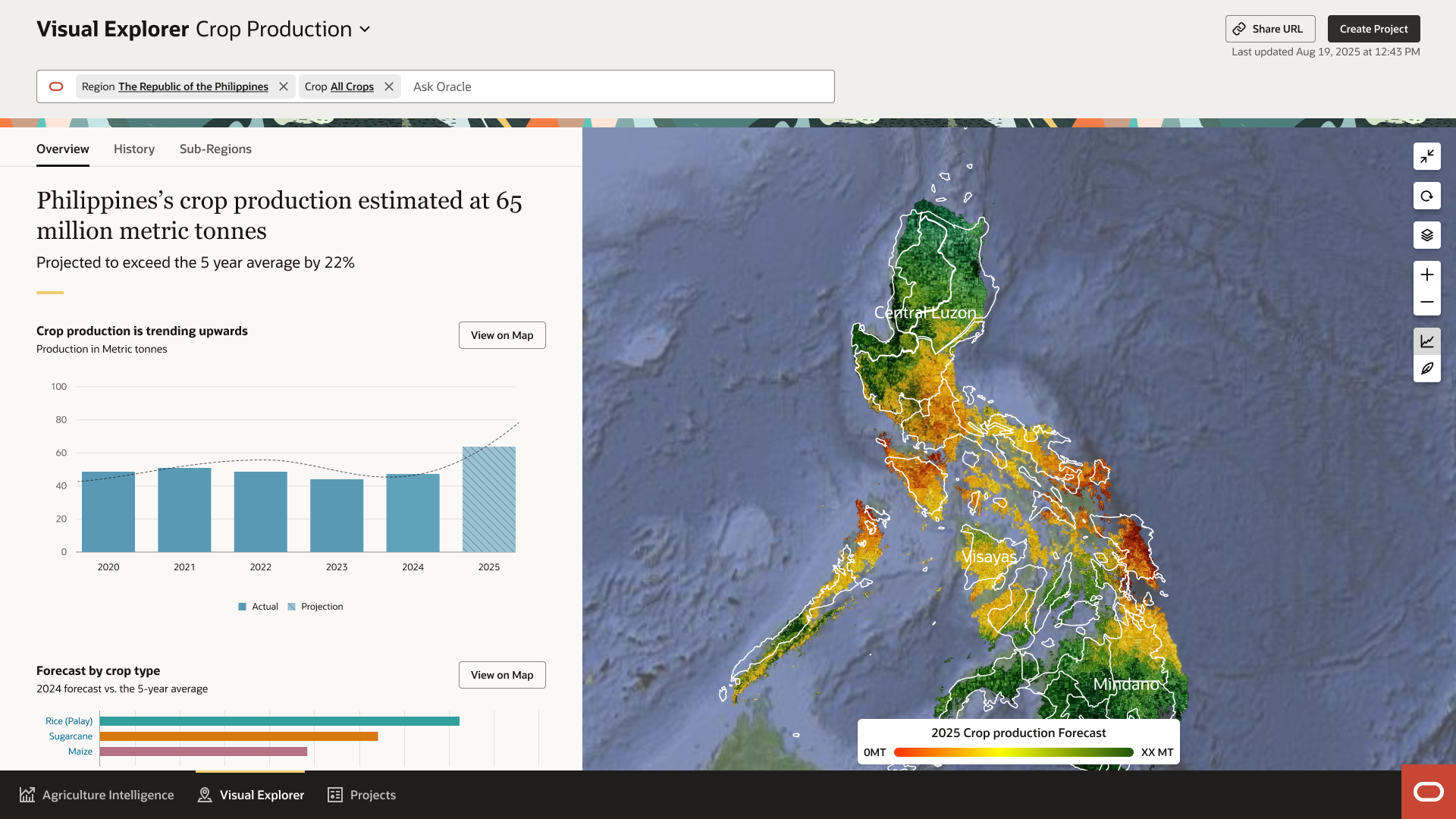
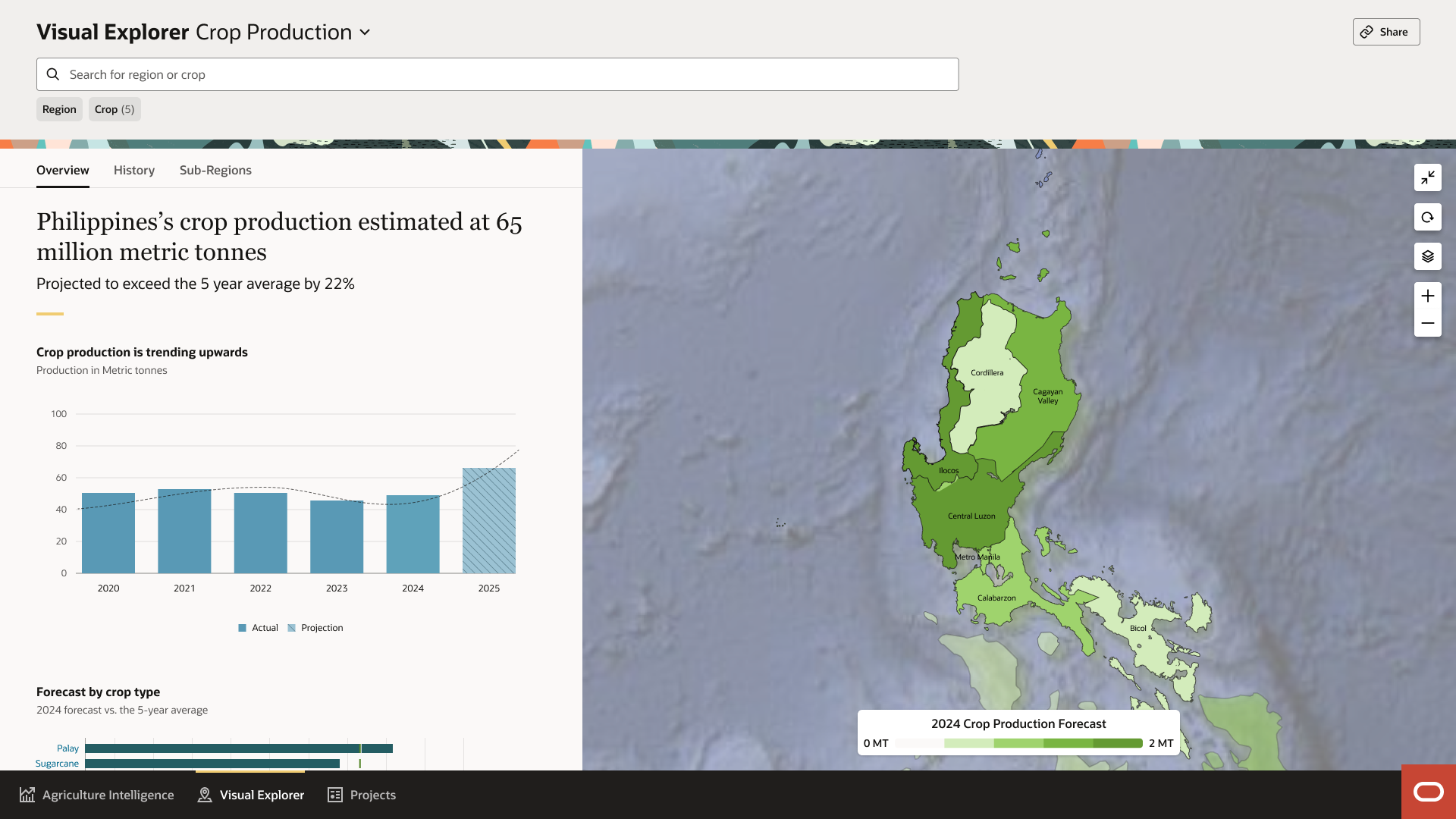
The shift made the map functional across every level of decision-making. An extension worker on a single farm and a minister looking at the country as a whole now see the same data, rendered at the resolution that matters for their work.
Food security is multifaceted, but one way of approaching it starts with surfacing the data and showing how everything connects. That's what Visual Explorer was built to do.
Everything that came after, subsidies, stress detection, AI-generated insights, scenario planning, only worked because this foundation was in place.
Against the benchmarks we set at the start, the shifts looked like this:
"I don't have to wait for the next report to know what's happening. If a drought is building in my district, I see it early and advise my farmers in time. I no longer rely on assumptions, I act on what's actually on the ground."
Farm extension worker