Selected works
Founding Product Designer · 2024 · Superlist

Command Palette

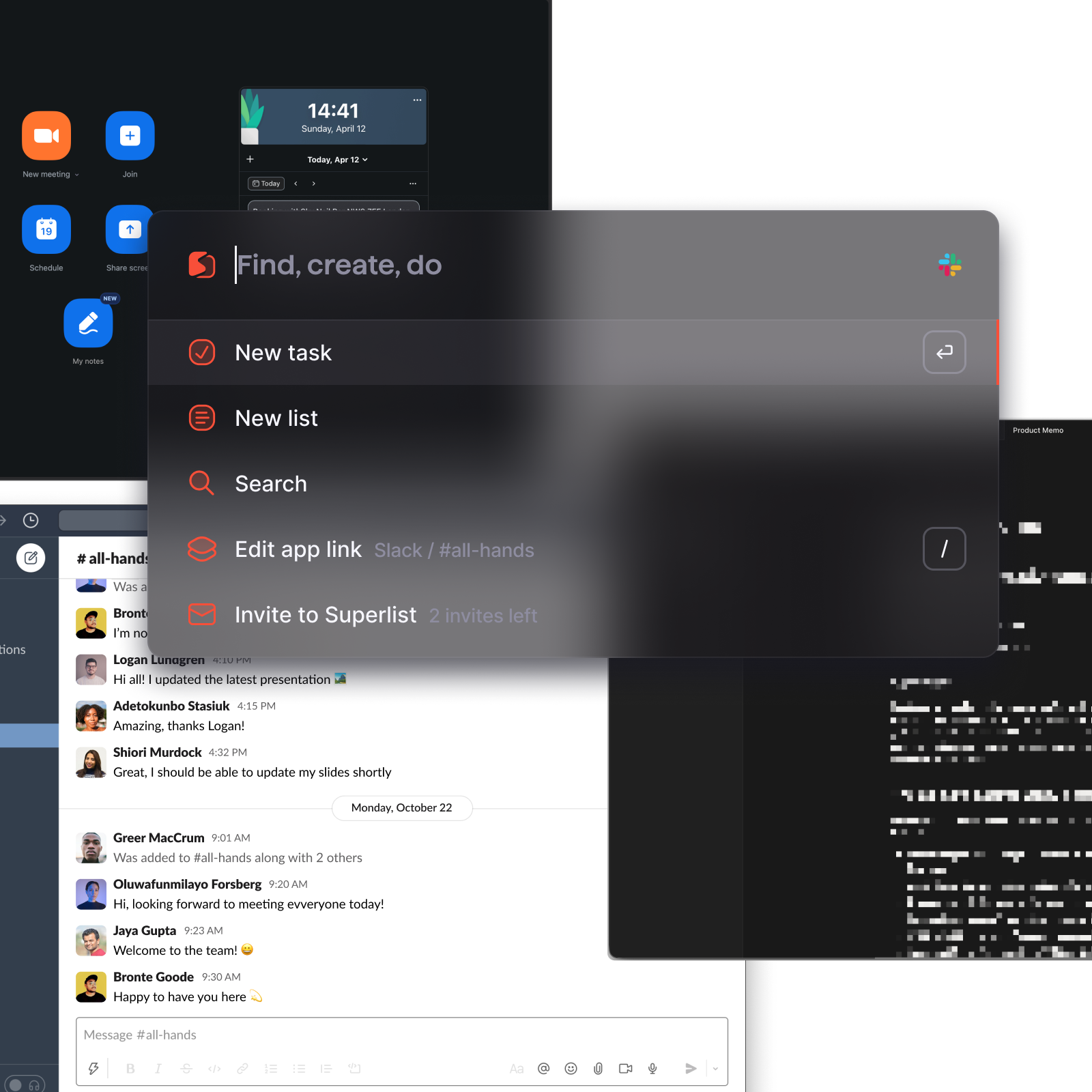
Most productivity tools solve the problem of moving work between apps. Quick Command was designed for a different gap, the moment intent surfaces before you're inside any tool at all

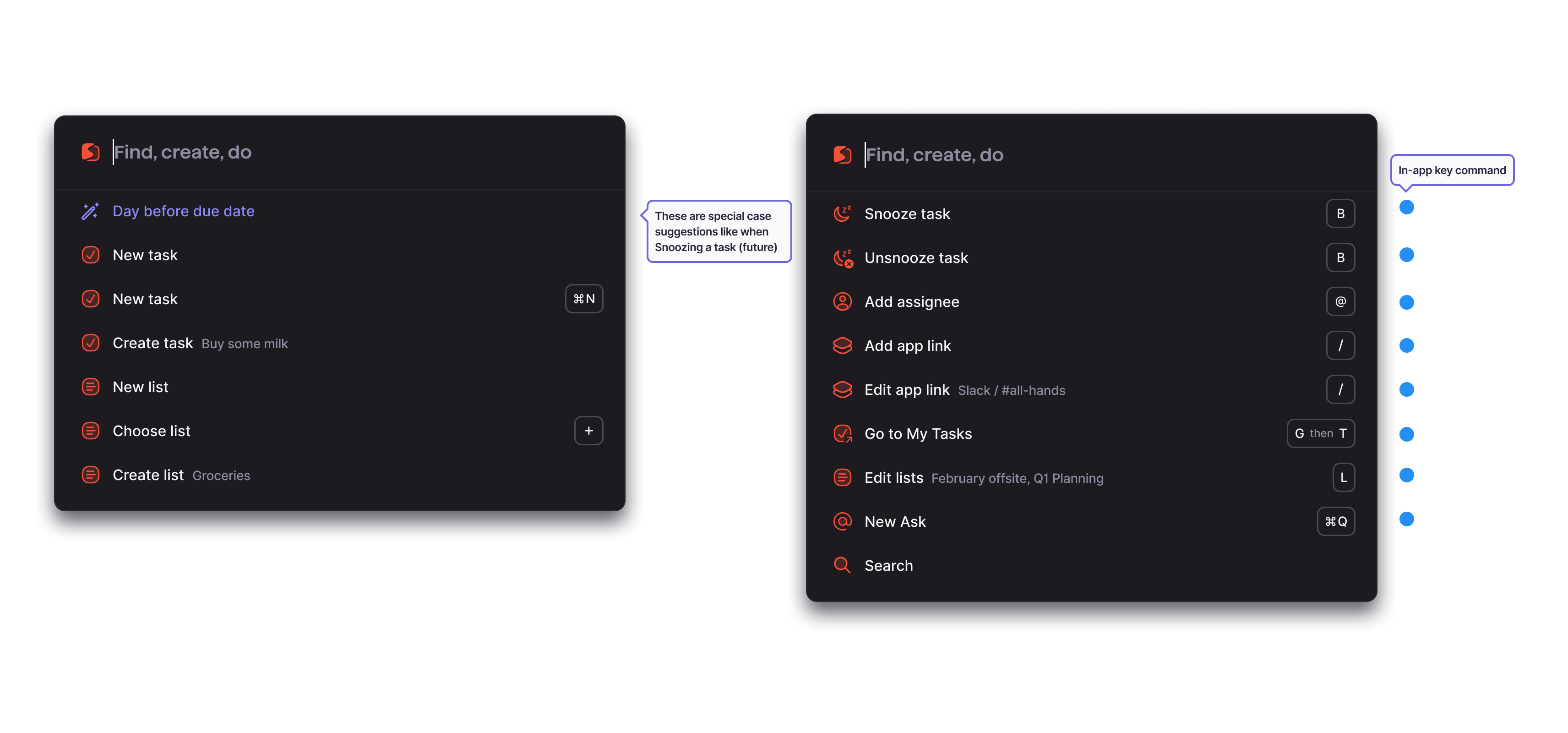
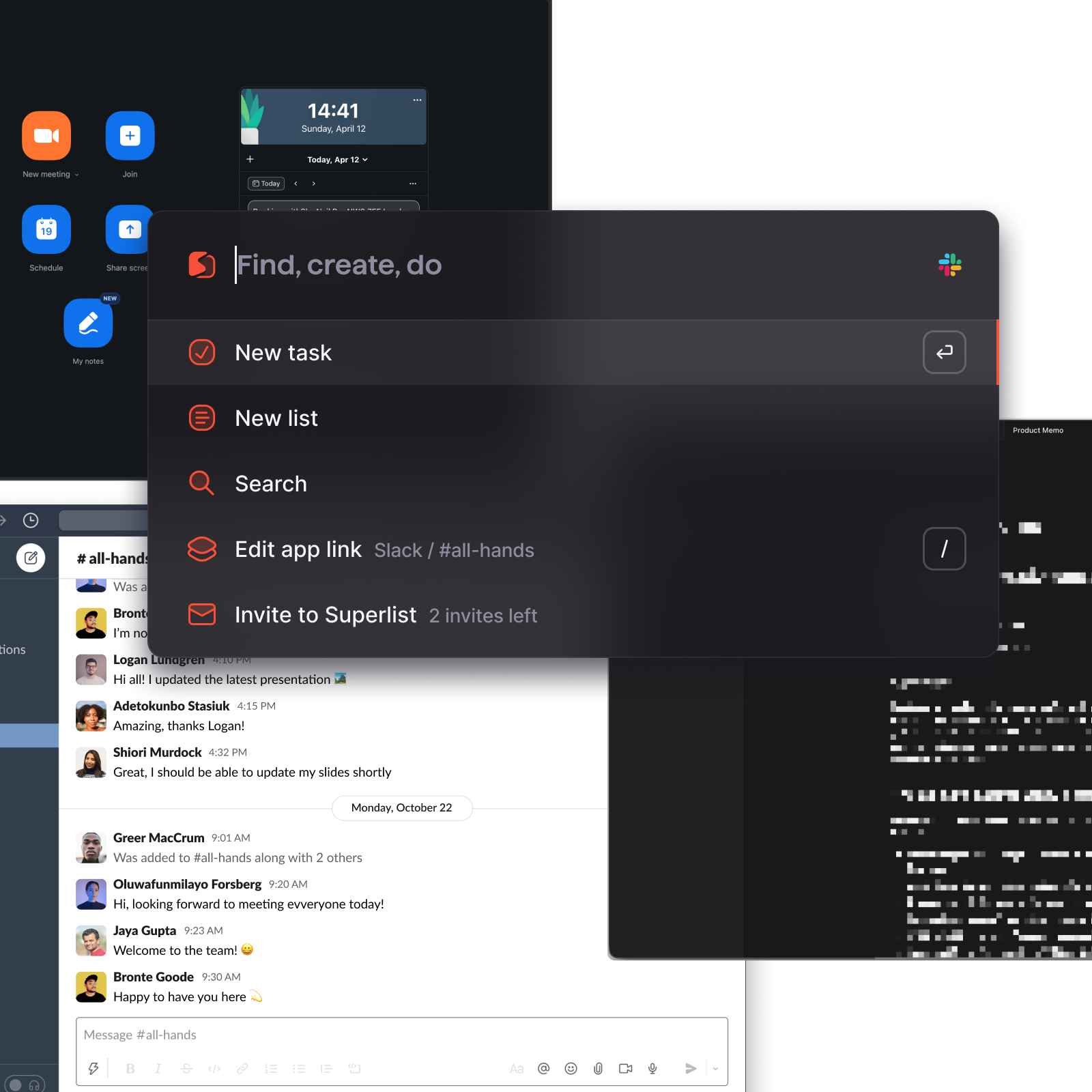
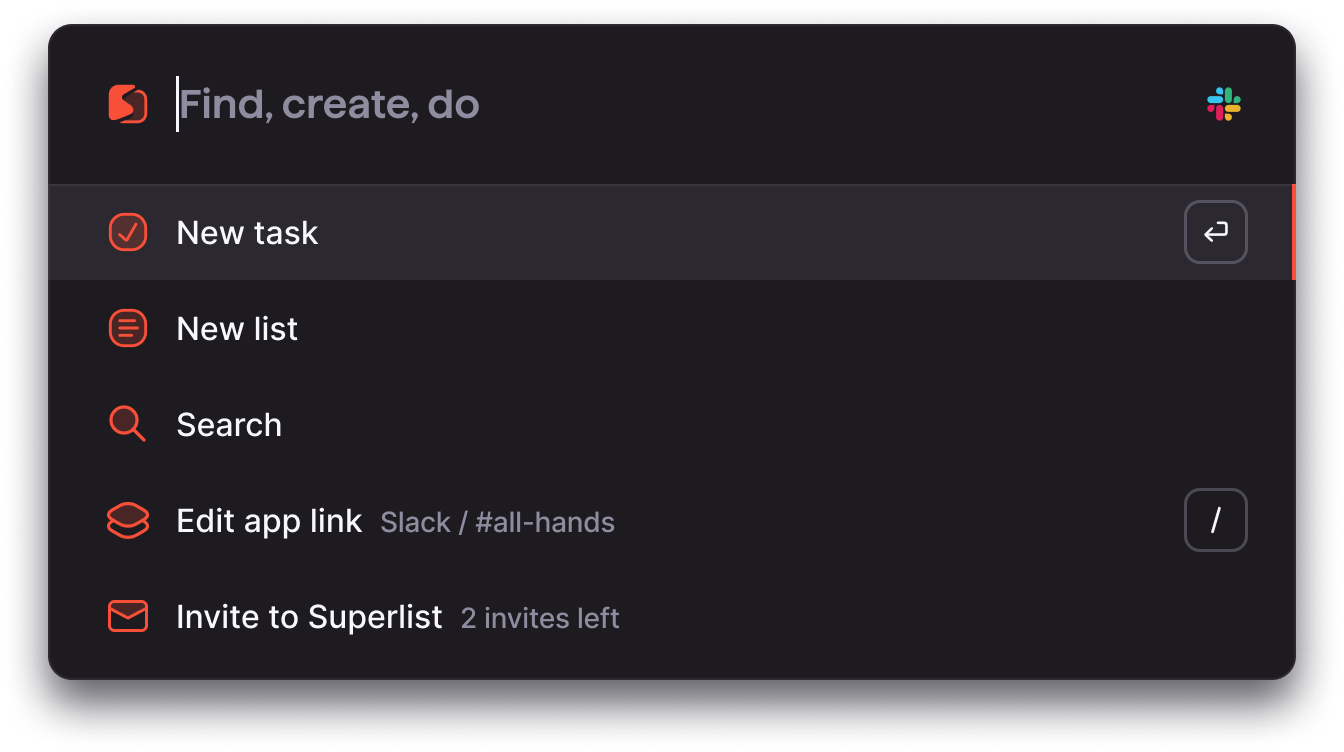
Quick Command, Find, create, do
Design process
I · Signal Tasks going nowhere
II · Research Patterns + interviews
III · Design Reframe → concept → iterate
IV · Ship Adoption + impact
M · 01 Tasks going nowhere Inside All Tasks, a growing backlog of captures that never moved. Not completed. Just sitting.
M · 02 Observed patterns Passive observation first — session recordings, usage data. Capture happening, commit not.
M · 03 Structured research Two user types: high-engagement still struggling, low-engagement bouncing. Same intent gap.
M · 04 Remove the form The reframe. Not faster creation — remove creation. The intent IS the task.
M · 05 Command layer Floats above the product. Same input, any context. No location, just intent.
M · 06 Iteration Metadata-before, ambient cursor, glass-morph palette — tuned to the moment of intent.
M · 07 43% adoption 43% of active users. 40% of all tasks created through it. Capture-to-commit under 4 seconds.
At a glance

43% of active users adopted Quick Command

Measured as unique users invoking Quick Command on three or more days per week, sustained across the rollout window.

~40% of all tasks created through Quick Command

Within weeks of launch, Quick Command became the most-used entry point for task creation, ahead of the sidebar and list views.

Navigation events down 15% per session

Users stopped navigating to create. The drop in page-to-page movement reflected a shift from location-based to intent-based workflows.

Capture-to-commit under 4 seconds

Median time from opening Quick Command to completing a task with metadata, compared to the previous flow which required multiple screens.

01, The Problem
The problem

Tasks were being created. They just weren't going anywhere.

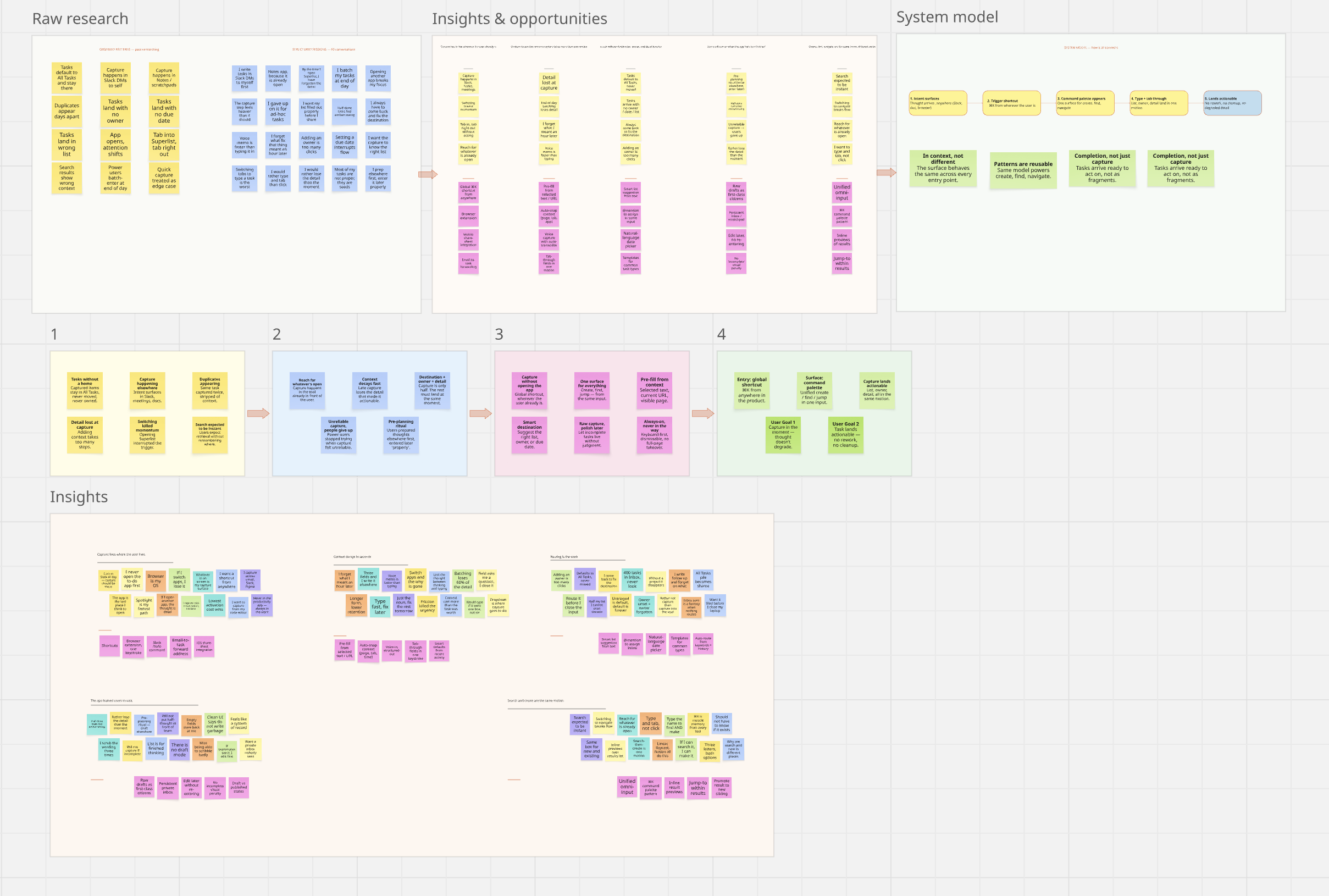
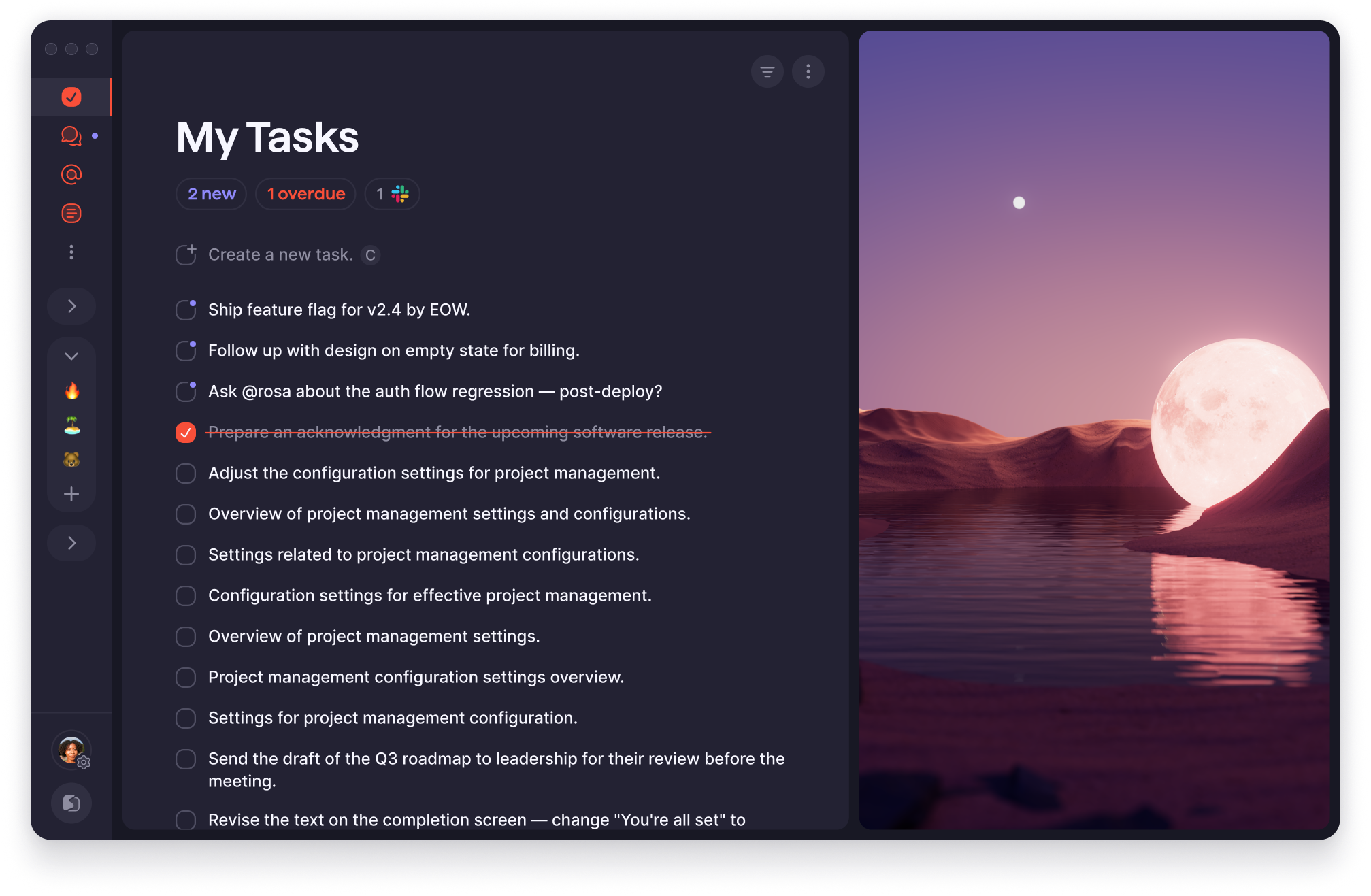
The first signal came from the product data. Inside All Tasks, Superlist's catch-all view, we found a growing backlog of tasks that had been captured and never touched again. Not completed. Not moved. Just sitting. We started asking why.

Two failure modes emerged. For some users, capture hadn't happened at all, intent surfaced mid-meeting, and by the time they were back in Superlist the moment had passed. For a larger group the problem was different: capture had happened, but the task hadn't landed correctly. No destination, no assignee, no context. It existed. It just didn't mean anything anymore.
The data told us what was happening. To understand why, I needed to watch how people actually worked, not just what they left behind in the product.

02, Observed Patterns
Observed patterns

What we kept seeing

Before running structured sessions, I went passive, session recordings, usage data, watching where interactions broke without anyone flagging it. Everything that surfaced before we went looking for it.

Tasks without a home

Captured items defaulted to All Tasks and stayed there, never moved, never completed, never owned.

Capture happening elsewhere

Intent surfaced in Slack, meetings, and docs. Users weren't in Superlist when the thought arrived.

Duplicates appearing

The same task created twice, once stripped of context, once properly placed later, as if the first never existed.

Detail lost at capture

Tasks arrived as a bare line with no assignee, date, or destination, because adding any of it required too many steps.

Switching killed momentum

Opening Superlist to create a task interrupted the thing that triggered the task in the first place.

Search expected to be instant

Users expected retrieval without navigating, remembering where something lived felt like the wrong problem to solve.

These patterns held regardless of role or team size. But observational data only shows what happened, not why it kept happening even for users who were highly engaged. That meant talking to people directly, and separating two very different types of user.

03, Research
Research

What structured sessions revealed

Working with the embedded researcher, I ran 16 structured sessions with beta power users, people already using Superlist regularly enough to have formed habits around it. We split deliberately into two cohorts. The first was personal organizers: freelancers and individuals managing their own tasks, projects, and life admin. The second was small business owners and team leads who were actively project managing inside Superlist, assigning work to others, tracking deliverables across multiple lists.

The distinction mattered. Personal users had a capture problem, getting the thought down before it degraded. Team users had a capture-plus-coordination problem: the task had to land in the right list, reach the right person, and carry enough context to be actionable immediately, because someone else's work depended on it.

Insight 01

Users reached for whatever was already open, Slack DMs, Notes, voice memos, because that's where the thought arrived. Superlist wasn't part of the capture moment.

Insight 02

Context decays fast. Tasks captured minutes later lacked the detail that made them actionable, users found old tasks and couldn't remember why they mattered.

Insight 03

Capture was only half the job. Tasks needed a destination, an owner, and enough detail to be actionable, all in the same moment. Without it, they arrived meaningless.

Insight 04

When capture felt unreliable, users stopped trying. Many had given up on Superlist for in-the-moment capture entirely and weren't coming back.

Insight 05

Even when users intended to use Superlist, they'd prepare first, writing the thought down elsewhere, then entering it later when they could do it properly. The app communicated that it was for finished thoughts. Raw ideas didn't belong yet.

The fifth finding was the one that changed the frame. Users weren't avoiding Superlist, they'd built a ritual around it: capture the thought elsewhere first, enter it properly later. The app had communicated a standard of completeness that users felt they had to meet before they showed up. That insight, that the product was treating itself as a destination for finished work, not a tool for raw capture, rewrote the problem entirely.

04, Reframing
Reframing

From a faster form to removing the form entirely

The initial frame, from product data and early stakeholder conversations, was that tasks weren't getting completed and All Tasks wasn't being revisited. The proposed fix: surface tasks better, reduce creation friction, nudge users back to what was open. It treated the problem as navigation and visibility.

Research pointed elsewhere. Users weren't skipping Superlist out of habit, they were pre-planning around it. They'd write thoughts down elsewhere first, then enter them later when they had time to "do it properly." The app had communicated, without saying it, that it was for finished thoughts. Raw ideas didn't belong there yet. The problem wasn't completion, it was that the product required users to make things proper before they could use it at all.

The original brief Surface incomplete tasks and speed up creation, treat the problem as a completion and navigation issue

Assumes users are inside the product and need a faster path. Doesn't account for when capture needs to happen outside it.

The reframe Let users capture from anywhere, with enough detail, without needing to make things proper first

Treats the problem as a structural mismatch. Solves for the moment of intent, not the path back to the product.

The research made the case straightforward, every insight pointed to the same structural gap. We brought the reframe to design leadership and the conversation moved quickly. The question wasn't whether to build something new. It was how far this pattern could reach, and which other moments in the product were suffering from the same mismatch. That conversation expanded the brief from a create shortcut to a full command layer, creation, search, and navigation unified in one surface, accessible from anywhere in the product.

With the brief reset, the question became: what do users actually need this layer to do?

User goal

User goals

I need to capture a task the moment it occurs, from wherever I am, without entering the product, so that the thought doesn't degrade before it can be acted on.

I need every task I create to land in the right place, reach the right person, and carry enough detail to be actionable, in the same motion as capturing it, so that nothing needs to be recreated or cleaned up later.

These two goals defined the system we needed to build.

05, System Model
System model

A command layer that floats above the product

The solution was structural: a command layer that sits above the existing product, accessible from any context, inside Superlist or outside it entirely. Users didn't need to know where something lived. They only needed to know what they wanted.

Where it starts User is anywhere, mid-meeting, in a browser, inside another app, or already in Superlist
Invoke Open Quick Command, ⌘K on desktop, dedicated button on mobile
Create

New task with full context, list, assignee, due date, all set in one motion. Add as much or as little detail as needed before committing.

Search

Existing tasks and content surface instantly. Find, update, and add context to anything, without navigating away from the current view.

Navigate

Jump to any list, project, or view directly. Move through the product quickly without needing to know where anything lives.

06, Interaction model
Interaction model

Designing for the moment of intent

The command layer was built around a single principle: actions should happen at the moment of intent, not after navigation. Instead of guiding users through flows, the system adapts to where they already are, allowing them to act without interruption.

Principle 01 In context, not deferred

Every decision about a task, where it goes, who owns it, what it means, should be made at the moment of creation. Deferring organisation is how context disappears.

Principle 02 Reusable patterns, not new ones

The interaction model should rely on conventions users already know. Building a new mental model for a capture tool has too high a cost, the system must feel familiar from the first use.

Principle 03 Completion, not just capture

A captured task that doesn't land correctly isn't captured at all. Every action should end with the user confident that the task exists, has an owner, and is in the right place.

Capture
01

Capture from anywhere

Intent surfaces outside the product, in meetings, browsers, conversations. This was the starting point of the problem. Quick Command is invokable from anywhere, so capture happens at the moment of thought rather than after a context switch back into Superlist.

Structure
02

Create and structure in one step

Capture without context was the root of the duplicate task problem, tasks landing in All Tasks with no destination, no owner, no meaning. This interaction closes that gap: destination, assignee, and due date are set in the same motion as the task name, with no follow-up editing required.

Shorthand
03

Shortcuts and natural language

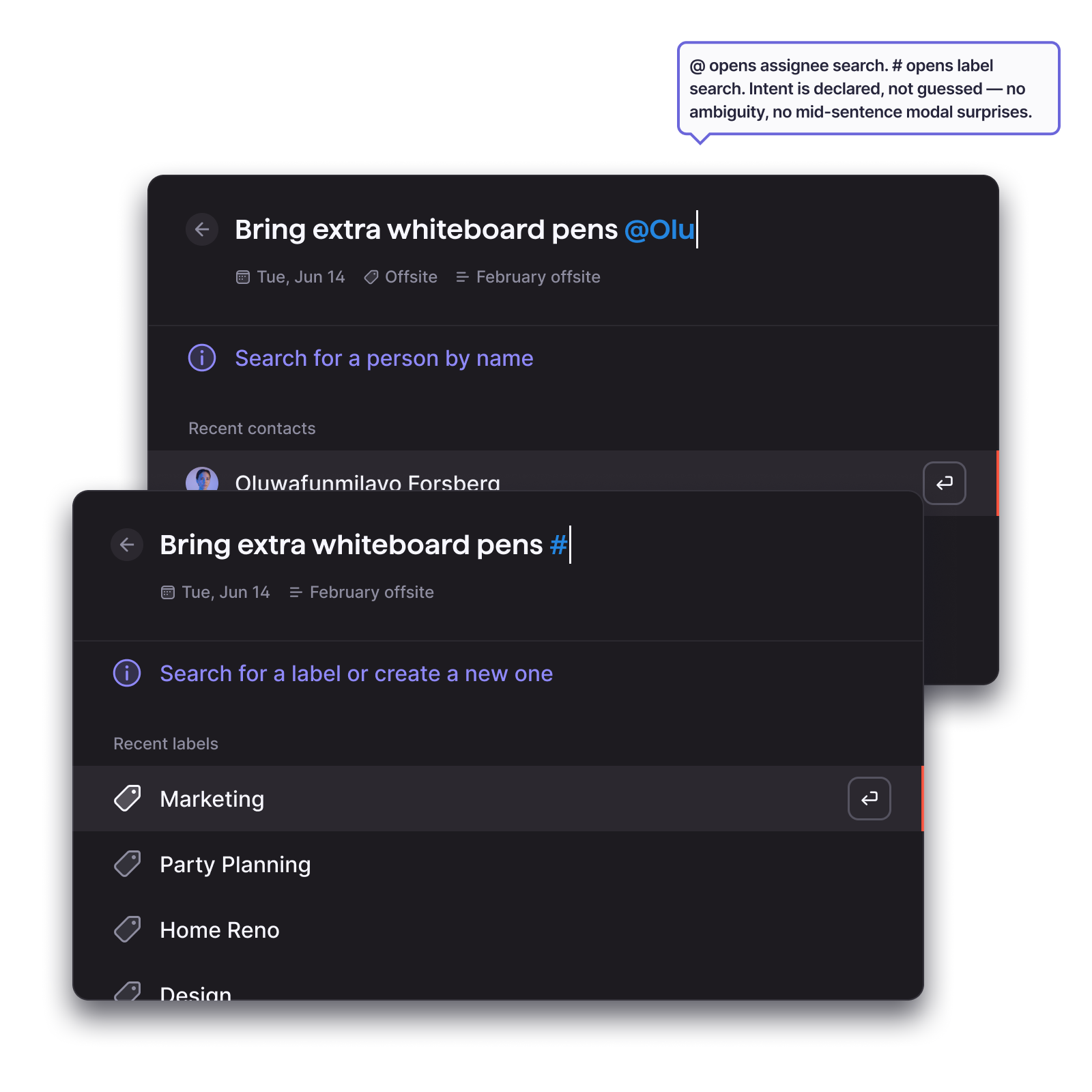
Quick Command can do more than most users expect the first time they open it. The design challenge was making that depth discoverable without requiring documentation. Shorthand triggers, @, #, natural-language dates, are the educational layer: each one surfaces a capability at the exact moment it's relevant, so users learn what Quick Command can do by using it rather than reading about it first.

Quick Command keyboard shortcuts reference
Act
04

Find, create, and move in one place

Users expected retrieval to be immediate, remembering where something was stored felt like the wrong problem to solve. Search lives in the same layer as creation, so finding an existing task and creating a new one are the same gesture. Navigation becomes intent, not location.

07, Iteration
Iteration

What testing revealed, and what changed

The hardest call: inference vs explicit triggers

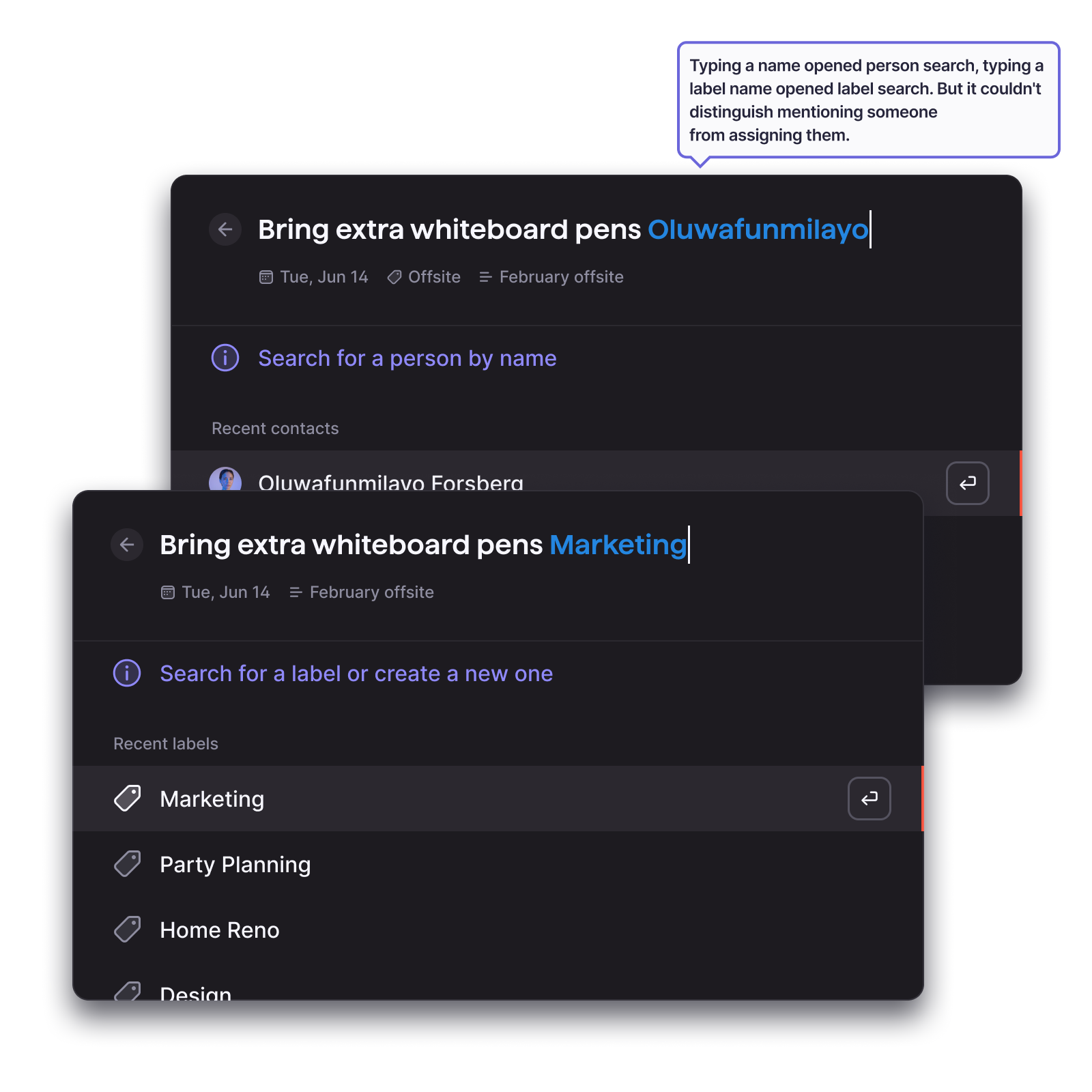
The first version of metadata input tried to be smart. Users could type naturally, "Buy milk for Bronte on Tuesday", and the system would infer the assignee, date, and context. In testing, this felt magical when it worked and deeply frustrating when it didn't. An incorrect assignee sent a task to the wrong person silently. Users had no way to predict what the system would infer, so they had to verify every output, defeating the speed advantage entirely.

We replaced inference with explicit triggers borrowed from conventions users already knew. The trade-off was deliberate: we gave up the appearance of intelligence in exchange for predictability and control. Users could now trust that what they typed was exactly what would be created.

Before Metadata input, before Free-form inference, caused silent incorrect assignments users had to catch and fix
After Metadata input, after Explicit triggers replace inference, predictable, familiar, no documentation needed

Other issues found in testing

Command hierarchy unclear at the top level
Suggestion relevance inconsistent with user intent
Task destination unclear after creation

Refinements made

Reordered command hierarchy to surface most-used actions first
Prioritised recent and contextual suggestions over global results
Added destination indicator and confirmation state after creation
Before Glass morph, before Original surface, less legible against varied backgrounds
After Glass morph, after Refined glass morph, higher contrast, consistent legibility across contexts
08, Where it led
Impact

A new centre of gravity within the product

Quick Command was scoped as a power-user accelerator, built for people who already knew Superlist well and wanted to move faster. The first cohort to reach high adoption wasn't power users. It was people who had been using the product primarily as a list view. Quick Command gave them a simpler relationship with the product: they no longer needed to know where anything lived. The mental model shifted from "navigate to the right place" to "say what you want and go."

That shift, from location-based to intent-based interaction, turned out to be a design principle, not just a feature outcome. It shaped how we thought about what Superlist's default surface should be, and how much users should need to know about the system to use it well. The command layer stopped being a shortcut. It became the primary way people related to the product.

09, Reflection
Reflection

What designing for intent taught us

01 When task capture happens outside the product 43% of the time, the fix isn't a better in-product flow, it's a layer that reaches where users already are
02 A −15% drop in navigation events wasn't a usability win. It was evidence that the mental model had shifted: from "go somewhere to do something" to "say what you want and go"
03 Quick Command's first adopters weren't power users, they were people who wanted a simpler relationship with the product. A command layer can lower the floor, not just raise the ceiling
04 Integration solves coordination between tools that support it. It doesn't solve the moment before you're inside any tool. Design for the source of intent, not the destination of the task
Previous project Artificial intelligence for agriculture Next project A subscription model for lawyers